
How to Add Your Business to Apple Maps: A Step-by-Step Guide
Every iPhone has Apple Maps built in, and it shows its own version of your business. Here's how to claim it with


Searching for the best website hosting for small business usually turns up long lists of brand names. But the best website hosting for small business is not a brand. It's the host that keeps your site up, fast and safe, and answers when something breaks.
We host and look after websites for local service businesses. This guide gives you the checks we use to judge any host. You'll know what to ask, what to avoid and how to tell if your current host is doing its job.
Your website is a set of files and a database. Hosting is the computer, called a server, that stores them and sends them to anyone who visits.
When hosting is good, you never think about it. When it's bad, your site is slow, goes down at random or gets hacked. Each of those costs you calls.
Small business website hosting comes in a few kinds. For most local businesses, the choice comes down to two.
Shared hosting puts your site on a server with many other sites. It's the cheapest kind. You get a control panel and you do the rest yourself: updates, backups, security and fixes.
Managed hosting means the host looks after the site for you. Updates, backups, security checks and speed tuning are part of the service. It costs more, but your time is worth something too.
| Shared hosting | Managed hosting | |
|---|---|---|
| Who does updates | You | The host |
| Backups | Often extra or basic | Daily, restored for you |
| Speed | Shared with other sites | Tuned for your site |
| When it breaks | You open a ticket and wait | The host fixes it |
| Best for | Owners who like to tinker | Owners who want it handled |
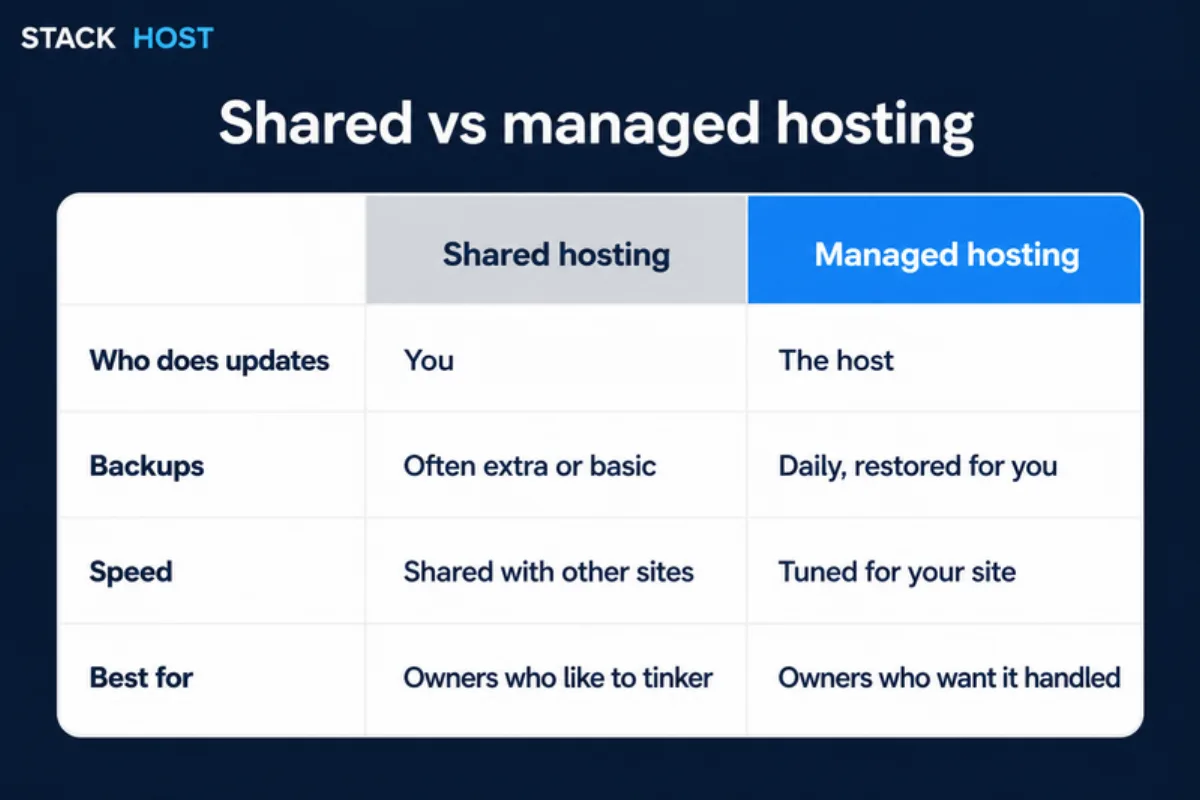
Does your site run on WordPress, and you don't want to touch it? Then managed hosting is usually the better fit. Here's more on what managed WordPress hosting means.
The fix: be honest about who will do the upkeep. If the answer is "nobody", pick managed hosting, or a plan that includes website care.
The best small business website host is the one that passes six checks. Run any host through them before you sign up. Run your current host through them too.
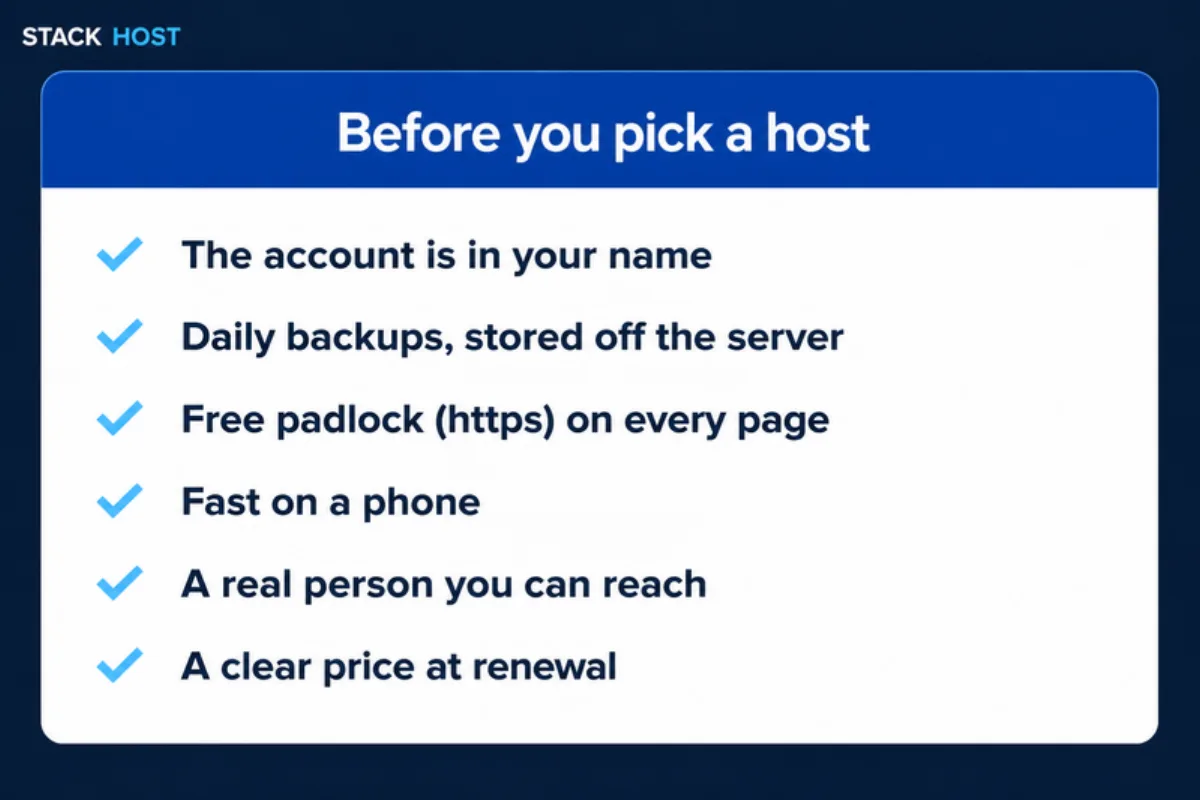
This is the problem we see most. A designer or nephew set up the hosting and the domain in their own name. Years later, they've gone quiet, and the owner can't log in to their own website.
The hosting account and the domain should be in your business name. The login email should be one you control. Your designer can have their own access, but you hold the keys.
The fix: ask your host and your domain company, in writing, whose name each account is under. If it isn't yours, ask for it to be moved to you now, while everyone is still friendly. If they've vanished, read what to do when the person who built your website has gone silent.
A backup you can't restore is not a backup. Sites break after bad updates, hacks and simple mistakes. A good backup turns a lost week into a lost hour.
Look for three things. Backups run every day, and they're stored somewhere other than the server your site lives on.
And someone can restore one for you, fast.
The fix: ask the host how often backups run, where they're kept and how you restore one. Then ask to see the most recent one. Our guide to website backups covers this in more detail.
Most hacks on small business sites aren't personal. They're automated attacks looking for old software and weak passwords. Your host should make those attacks hard.
The fix: ask which of these are in the base price and which cost extra. Turn on two-step login for your hosting, domain and website accounts today.
Many of your customers find you on their phone, often in a hurry. A slow site sends them back to the search results and on to the next business.
Google's own guidance encourages site owners to have good Core Web Vitals. These measure how fast and stable a page feels. Hosting is not the only thing that affects speed, but a slow server holds everything back.
The fix: test your homepage in PageSpeed Insights, Google's free tool, and look at the mobile result. If it's poor, ask your host whether the server or the site itself is the cause. Big photos and too many plugins are often to blame.
Your site will go down at some point. When it does, you want a person, not a help article. Support you can reach is worth more than any feature on a sales page.
The fix: test support before you buy. Call or start a chat with a pre-sales question, and note how long it takes to reach a person. Ask their support hours, and what counts as an emergency.
Many hosting plans start low for the first term, then renew at a higher price. Others add charges for backups, security or the padlock. None of this is wrong, but you should know before you sign.
The fix: ask for the renewal price in writing. Ask what's included in that price and what costs extra. Compare the full yearly cost, not the first month.
Walk away, or at least ask hard questions, if you see any of these:
Copy these into an email. A good host will answer them clearly. A vague answer tells you something too.
You don't need to switch to fix most problems. Start by checking what you have.
If two or more of these fail, it's time to talk to your host or look at moving.
The fix: when you move, keep your page addresses the same where you can. If any change, set up permanent (301) redirects from the old addresses to the new ones. That helps your visitors and Google find the new pages.
We build, host and look after websites for local service businesses, from roofers to restaurants. Hosting comes with care, so you're not the one doing updates or chasing backups. We also help with local SEO and your Google Business Profile, and we send plain-English reports.
If you'd like a second opinion on your current host, book a free website review.
It can be, if someone handles updates, backups and security. The low price often leaves those jobs to you. If no one will do them, the savings can cost you later.
Either way works. One company is simpler. Two companies means a problem with one doesn't lock you out of both. What matters most is that both accounts are in your name.
A careful move usually goes smoothly. Keep the same pages at the same addresses, redirect any that change and check for errors afterwards. Rushed moves with broken links are what cause trouble.
Yes, most website builders include hosting in the monthly price. The trade-off is that moving your site elsewhere later can be harder. Check what you can take with you before you build.
Hosting is where your site lives. Maintenance is the upkeep: updates, backups, fixes and security checks. Managed hosting bundles some or all of the maintenance in.
Not sure your host is doing its job? Book a free website review and we'll check your hosting, speed, security and who owns the account. Or call us at (310) 776-6880.
Every iPhone has Apple Maps built in, and it shows its own version of your business. Here's how to claim it with

A plain guide to SEO for roofers: the map pack, service and storm pages, photos of real jobs, reviews, and the numbers
You search for what you do and your business isn't on the map. Here's how to check your profile, the 8 most