How to Remove a Bad Google Review, and What to Do When You Can't
A one-star review stings. Here's which reviews Google takes down, how to report and appeal one, how to reply when it stays,


Bing Places for Business is Microsoft's free tool for listing your business on Bing. It controls what shows up when someone finds you on Bing, Bing Maps and other Microsoft apps.
Most owners set up Google and forget Bing. That's a gap you can close in an afternoon. This guide explains why Bing still matters, how to list your business on Bing, and how to keep your details the same everywhere.
Bing Places is Bing's version of a Google Business Profile. It's the listing that shows your name, phone number, address, hours, photos and website when someone searches for you on Bing.
You manage it at bingplaces.com. It's free to use.
If you don't claim your listing, Bing may still show one. It builds listings from information it finds around the web. That information can be old or wrong, and you can't fix it until you claim it.
Google gets most searches. But Bing's results show up in more places than many owners expect.
That last point is growing. More customers now ask an AI assistant "who fixes air conditioners near me" instead of typing a search. Those tools pull from search results and business listings. If your details are missing or wrong there, you may be left out. Our page on AI search optimization explains how this works.
Setting up Bing takes less time than most website fixes. The listing then keeps working for you with very little upkeep.
Gather these first. It makes the setup quick.
Go to bingplaces.com and sign in. Bing gives you a few ways in. Pick the one that fits you.
If your Google Business Profile is already set up and correct, this is the fastest way. Bing Places lets you import your business details from Google in a few clicks.
Listings imported from a verified Google profile may not need a separate verification step. Bing tells you on screen if it still needs one.
The fix: an import copies mistakes too. Before you import, open your Google profile and check your name, phone, hours and categories. Our guide to optimizing your Google Business Profile walks you through it. Fix Google first, then import.
Search for your business name and city on bingplaces.com. If Bing already shows a listing for you, choose to claim it. Update anything that's wrong, then verify.
If Bing has nothing for you, create a new listing. Enter your details by hand. Choose the category that best matches what you do, such as "roofing contractor" rather than just "contractor". Add your photos and hours, then verify.
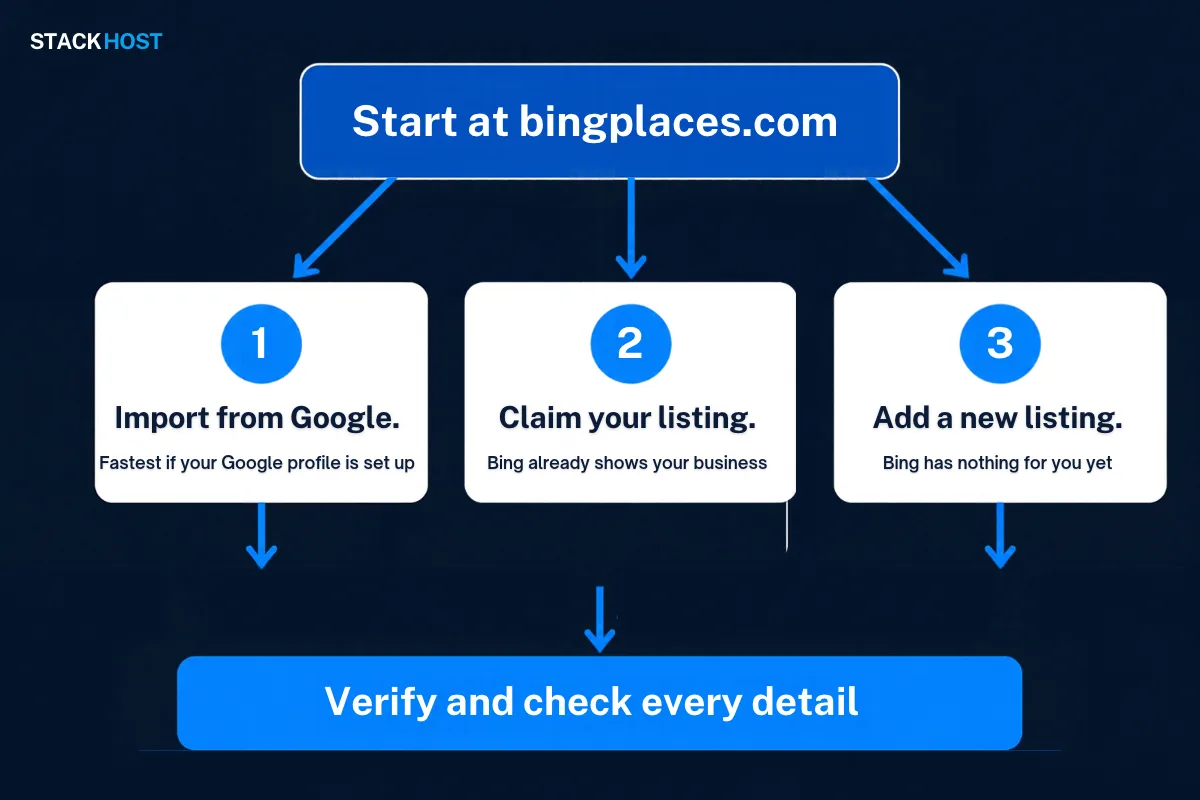
Verification proves you own the business. Until it's done, your listing may not show, or your changes may not go live.
Bing offers a few ways to verify, such as a code by phone, text or email. The choices depend on your business. Use whichever Bing shows you, and pick a phone or email you can reach right away.
Once verified, your listing can take some time to update across Bing. Don't make lots of changes in a row while you wait. That can slow things down.
Bing may list you under an old name, an old address or an old phone number.
The fix: search on bingplaces.com by your phone number, then by any old names or addresses you've used. If nothing turns up, add a new listing.
Duplicates happen after a move, a rebrand or a phone number change. They split your reviews and confuse customers.
The fix: claim the listing you want to keep and make it fully correct. Then use Bing's options to report the other one as a duplicate or as closed.
This usually means the phone or email on file is old, or a phone menu blocked the call.
The fix: update the phone or email if Bing lets you, then ask for a new code. If you have a phone menu, answer the line yourself while you wait for the call. Try a different method if one fails.
Plumbers, cleaners, dumpster rental companies and other service-area businesses often go to the customer.
The fix: when you set up the listing, choose the option to hide your address and list the areas you serve. Keep the service area realistic. Only list towns you truly cover.
Bing reviews changes before they go live. Some take a while.
The fix: give it time, then check the listing on Bing. If a change still isn't live after you've waited, sign in to Bing Places to see if anything needs your attention.
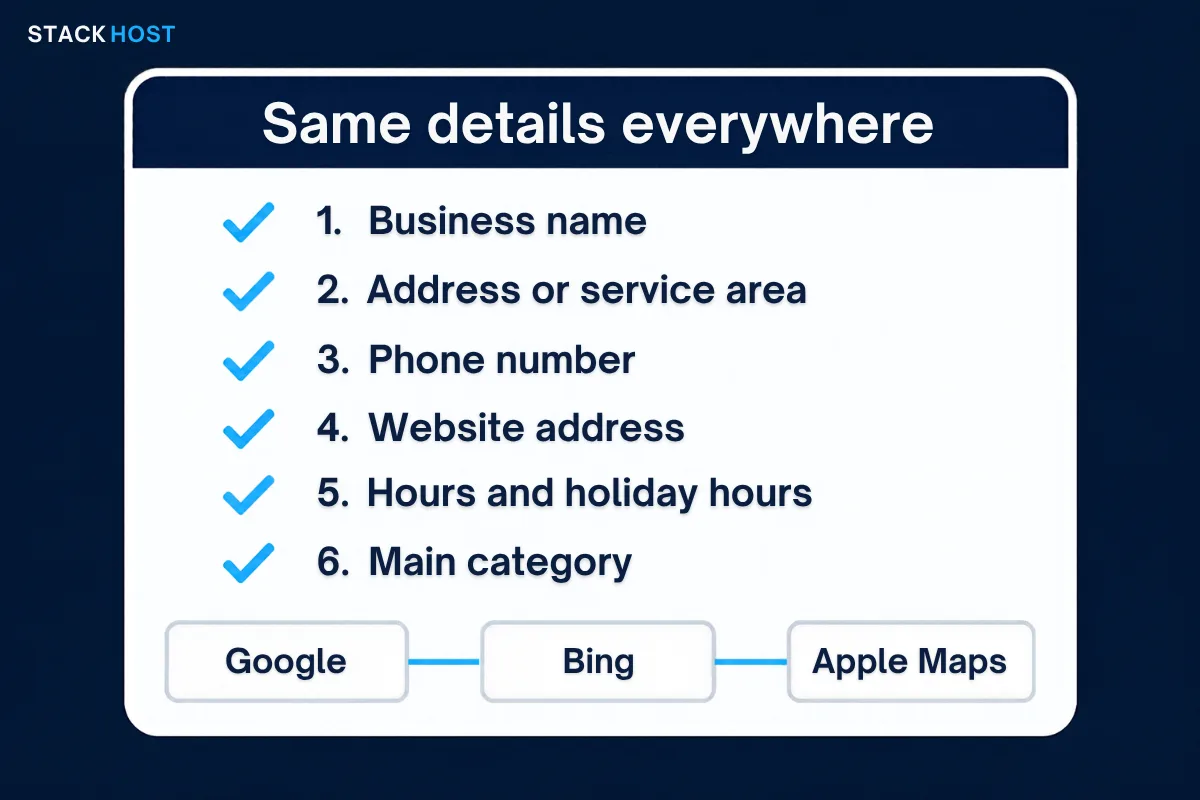
Search engines and AI tools compare your details across many sites. When they match, they trust them. When your phone is different on Bing, Google and Facebook, they can't tell which one is right.
This is the single most useful habit for any listing. It matters more than any trick.
| Detail | Keep it the same by |
|---|---|
| Business name | Using your real name only. No extra keywords or city names added. |
| Address | Writing it the same way each time, including suite numbers. |
| Phone number | Using one main local number everywhere. |
| Website | Linking the same version, with or without www, always with https. |
| Hours | Updating every listing on the same day, including holidays. |
| Category | Picking the closest match on each site. |
Start with the three big map listings: Google Business Profile, Bing Places and Apple Business Connect. Then check your website footer, Facebook page and the directories you're listed in.
The fix: make a simple note with your exact name, address, phone and hours. Copy and paste from it every time you update a listing. Here are more ways local listings help your local SEO.
Your listing and your website work together. Bing Places handles the map. Bing Webmaster Tools helps Bing find and understand your website.
It's free. If you already use Google Search Console, Bing Webmaster Tools can import your site from it. Then submit your sitemap so Bing can find all your pages.
The fix: sign in to Bing Webmaster Tools, add your site and submit your sitemap. If you're not sure where your sitemap is, ask your web host.
Once it's live, a few minutes a month keeps it healthy.
Yes. Listing your business on Bing Places is free. You only need an account to sign in.
Yes, if you want to be found by everyone. Bing's results show up in Bing, Bing Maps, Windows, Microsoft Edge and Copilot. Importing from Google makes it quick.
It depends on verification and Bing's review. Some listings go live quickly, others take longer. We can't promise a timeline, and nobody else can either.
It can help. Copilot can search the web with Bing, so correct Bing details give it correct facts about you. Matching details on every site help too.
Yes. Each location should have its own listing with its own address and phone number. The Google import can bring over several locations at once.
We look at your website, Google profile, Bing listing and other listings, and show you what to fix in plain English. Book a free website review, or call us at (310) 776-6880.
A one-star review stings. Here's which reviews Google takes down, how to report and appeal one, how to reply when it stays,
Google decides how you verify, not you. Here is how each method works, what to have ready, and what to do when
Keeping a website running can cost a few dollars a month or a few hundred. Here's each line item, what's fair to