Bing Places for Business: How to List Your Business on Bing
Bing Places for Business puts you on Bing, Bing Maps and Microsoft's apps. Here's how to import your Google profile, claim your


Website design for SEO means building your site so Google can find it, understand it and show it to people searching for what you do. Good SEO website design also turns those visitors into calls. A ranking that doesn't bring work isn't worth much.
A good-looking site can still be invisible. A new design goes live, and calls drop. Often the old pages vanished, or the new ones crawl on a phone.
This guide covers the design choices that help or hurt rankings. Each one comes with a fix you can do or ask for. At the end there's a checklist you can hand to your designer.
It isn't stuffing keywords into a page. It's a set of design choices that do three jobs.
SEO friendly website design won't rank a site on its own. Reviews, your Google Business Profile and your competition matter too. But a badly built site holds back everything else you do.
Google measures how a page feels to use with a set of scores called Core Web Vitals. Google's guidance for a good score:
Google says its ranking systems use these scores. Speed alone won't beat a more helpful page, but a slow site loses visitors before they read a word. The usual causes are huge photos, image sliders, too many plugins and slow hosting.
The fix: test your homepage and your main service page at PageSpeed Insights. Look at the mobile results. Ask your designer to shrink and compress photos, drop the slider and remove plugins you don't use. Our guide on how to improve website speed has more steps.
Google uses the mobile version of your site to index and rank it. Google calls this mobile-first indexing. If text or a section shows only on desktop, Google may not count it.
Warning signs: tiny text, buttons packed close together, pages that scroll sideways, and pop-ups that cover the page.
The fix: open your site on your own phone and try to call you, read a service page and send the form. Ask for a responsive design that shows the same content on phones and computers. Put the phone number at the top as a tap-to-call link. Skip pop-ups that cover the page when someone arrives. Google warns about them in its guide to intrusive pop-ups.
Many small business sites have one "Services" page that lists everything. Google ranks pages, not whole websites. A page about ten things rarely ranks well for any of them.
The fix: give each main service its own page. Say what you do, where you do it and what affects the price. Explain how a job works, add photos of your own work and answer the questions customers ask on the phone. Ask your designer for a service page layout with room for all of that.
Headings tell Google and readers what each part of a page covers. A main heading that says "Welcome to Our Website" tells nobody anything.
Designers sometimes pick heading tags by size, not meaning. You end up with three main headings, or none at all.
The fix: each page gets one main heading (the H1) that names the service and town, like "Water Heater Repair in [Your Town]". Use smaller headings (H2, H3) for sections. Ask your designer to set font sizes with styles, not by changing the heading tag. Give every page its own title too, as Google explains in its guide to page titles. Here's more on how to use headings for SEO.
If you work in several towns, a page for each main area helps you show up for searches like "dumpster rental [town]". But copying one page and swapping the town name backfires.
Google's spam policies warn against "doorway" pages. Those are lots of near-identical pages made only to rank for different places.
The fix: start with your three to five most important towns. Write each page fresh. Mention jobs you've done there, local details like permits or weather, and the neighborhoods you cover. Ask your designer for a location page layout with space for unique text and photos.
Google finds pages by following links. Google says it can reliably follow links that are standard <a> tags with an href address, as its link guidelines explain. Fancy menus built from buttons or scripts can hide pages from Google.
Pages with no links pointing to them are hard to find, for Google and for people.
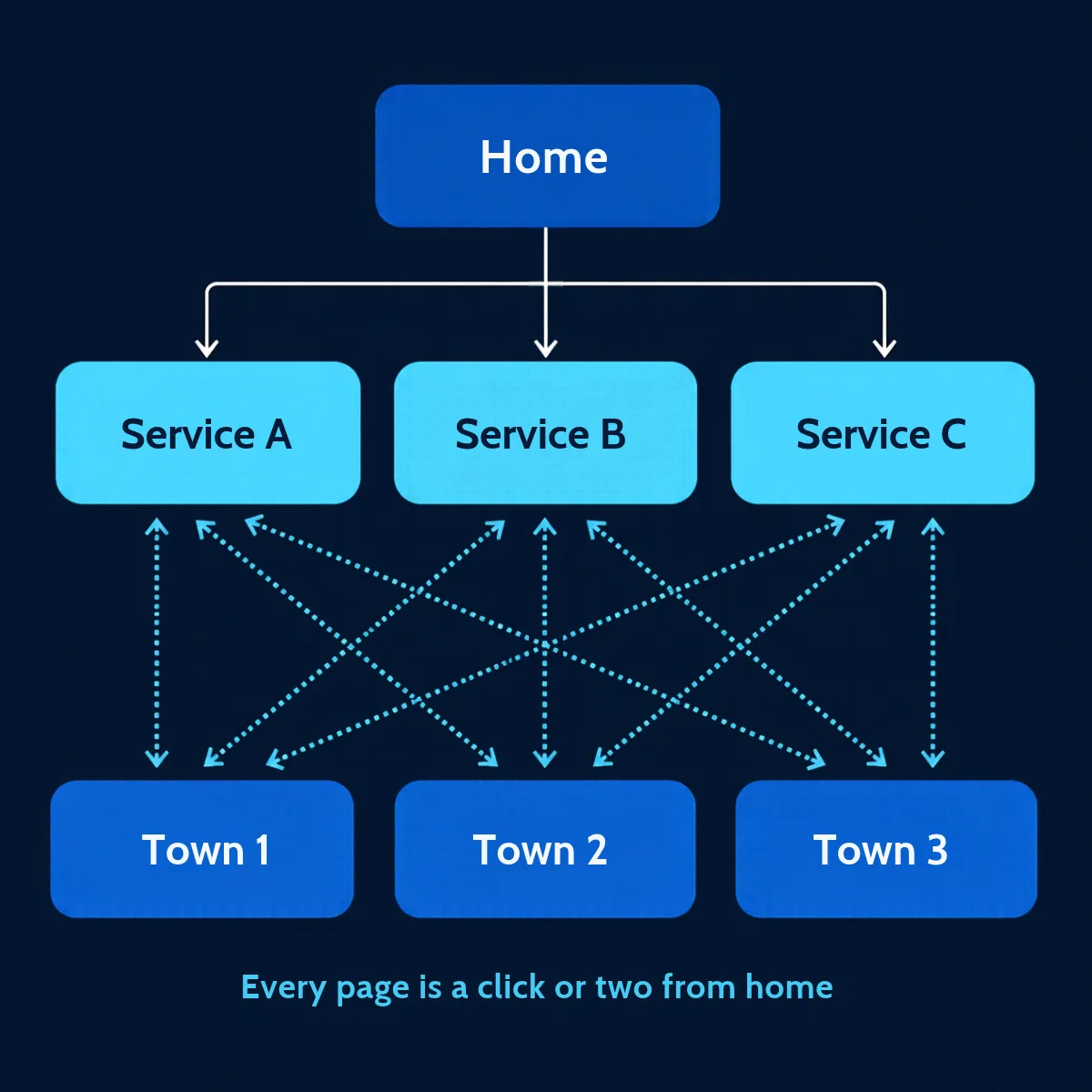
The fix: link every service page from your menu and your homepage. Link service pages to related services and to your town pages, and link town pages back. Use clear link words like "roof repair in [town]", not "click here". Every page should be a click or two from home.
Big banner images with the headline painted on look nice. But words inside a picture are easy for Google to miss. Google's image guidelines advise against putting important text, like headings and menu items, inside images.
The fix: keep your headline, services, towns and phone number as real text. Give each photo a short description (alt text), like "new metal roof on a two-story home".
A form doesn't change your rankings. But every visitor SEO earns is wasted if the form fails. Forms can fail when they send to an old inbox, land in spam or get blocked by a broken security check.
The fix: send yourself a test form every month and after every update. Keep the form short: name, phone, service, town and a message. Show a clear thank-you message so people know it went through. Make your phone number a tap-to-call link on every page.
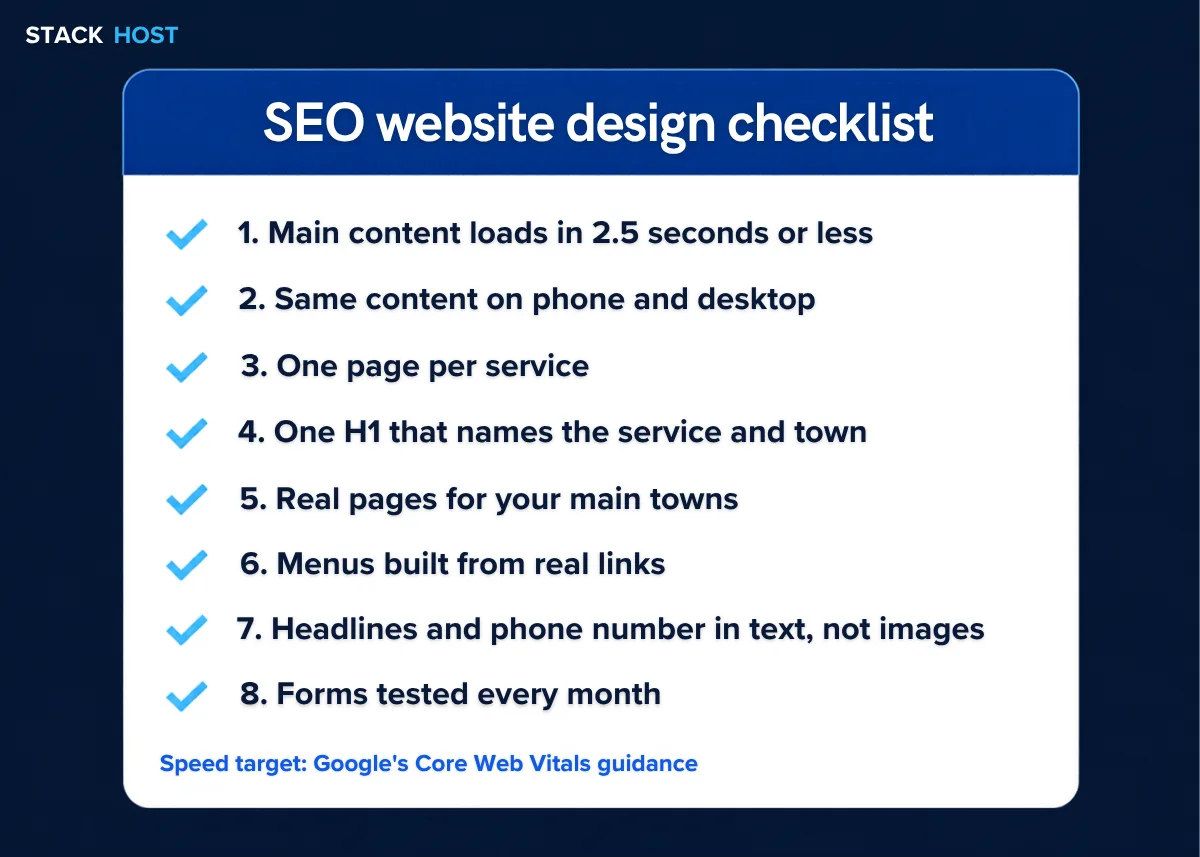
Use this table as your SEO website design checklist. Hand it over before work starts, and check it again before launch.
| Ask for | Why it matters |
|---|---|
| Main content loads in 2.5 seconds or less on mobile | Matches Google's Core Web Vitals guidance |
| Responsive design, same content on phone and desktop | Google ranks your mobile version |
| One page per main service | Each page can rank for its own search |
| One H1 per page that names the service and town | Tells Google and readers what the page is about |
| A unique title and description for every page | Shapes how your page looks in search results |
| Location pages with room for unique text | Helps local searches without copy-paste pages |
| Menus and links built from real links | Google can follow them to every page |
| Headlines and phone number in text, not images | Google can read them |
| Alt text on photos | Describes your images to Google and screen readers |
| Short, tested contact form and tap-to-call number | Turns visitors into leads |
Clean page addresses, like /roof-repair/ | Easy to read and to link to |
| A list of 301 redirects for any changed addresses | Helps protect the rankings you already have |
The biggest SEO risk in a redesign is changing page addresses. A page that ranked well for years can disappear overnight. Visitors who click the old link land on an error page.
The fix: before work starts, list every page on your current site. Your sitemap and the Pages report in Search Console help. Keep the same addresses where you can. Where an address changes, set a permanent (301) redirect from the old page to the closest new one. Google explains the process in its guide to moving pages.
After launch, submit your new sitemap in Search Console. Make sure no page is set to hide from search engines. Then watch the Performance report over the next few weeks for pages that drop.
It can, when it fixes real problems like slow pages, a poor phone layout or missing service pages. A new look on its own won't move your rankings. A careless redesign can even lose rankings you had.
WordPress, Shopify and other platforms can all rank well. What matters is control over titles, headings, page addresses, redirects and speed. We build on WordPress, Shopify and AI-built sites, and the checklist above applies to each one.
No. Google recommends responsive design, where one site adjusts to every screen, in its mobile-first indexing guide. It's the simplest to run, and phone and desktop visitors see the same content.
Nobody can promise a timeline. Google revisits pages on its own schedule, and your competition keeps moving. Search Console shows you when Google has seen your new pages and how they perform.
Start with our free check: is my website on Google? Or book a free website review and we'll go through this checklist with you. You can also call us at (310) 776-6880.
Bing Places for Business puts you on Bing, Bing Maps and Microsoft's apps. Here's how to import your Google profile, claim your
A one-star review stings. Here's which reviews Google takes down, how to report and appeal one, how to reply when it stays,
Google decides how you verify, not you. Here is how each method works, what to have ready, and what to do when